Tech Without the Jargon Get the handbook for $29 · $29

For adults who want clear answers to everyday technology problems.

Know what to check before you reset, replace, or pay.

A searchable PDF handbook with 100 practical solutions and seven printable worksheets for phones, Wi-Fi, TV, photos, passwords, and everyday online tasks.

  • Instant download
  • 172 pages
  • 7 worksheets
The Everyday Tech Rescue Handbook
172pages
7worksheets

Inside the book

Real pages, practical instructions, and decisions you can make at your own pace.

Sound familiar?

A small technology problem should not become a costly mistake.

The frustrating part is often not the error message. It is having to decide whether the next tap will fix the problem, cost money, or make something important disappear.

  1. 01

    Your phone says storage is full, but you cannot tell what is using the space or whether paying for cloud storage will help.

  2. 02

    Your smart TV keeps buffering even though the internet works on your phone.

  3. 03

    You want to clear old files without losing the photos and videos you cannot replace.

  4. 04

    A password, verification code, or unfamiliar sign-in screen leaves you worried about getting locked out.

  5. 05

    A pop-up, message, or supposed support contact makes an ordinary problem feel urgent.

  6. 06

    The advice you find jumps straight to an expensive replacement, a subscription, or a reset you do not understand.

Confirm the recipient, the material shared, and any access duration.
From the bookChapter: Stay Connected With Family and Friends
  • Let the device suit you

    Keep changes that make everyday tasks easier without hiding important alerts.

    Make Your Phone Easier to See, Hear, and Use
  • Test the failing function

    Before considering a reset or replacement, determine exactly what stopped working.

    When Your Phone Isn't Working Properly
  • Find the weak link

    Compare another app, device, or room before blaming your whole internet connection.

    Fix Your Internet, Wi-Fi, and Smart TV

Why I wrote this book

Why the safe first step matters

An error message can make a familiar device feel suddenly expensive. A full phone asks you to pay for storage. A television buffers when the Wi-Fi looks fine. A password code fails just when you need to get into an account. The tempting response is to press the next button and hope.

We built this handbook around a different starting point: understand what the warning actually means before changing anything important.

That means treating the photographs you cannot replace, the accounts you will need tomorrow, and the money you would rather not spend as priorities. The lessons are organized by everyday symptoms rather than technical vocabulary. Each solution aims to give you a useful first check, a way to test whether it worked, and a clear point where official or qualified help is the better decision.

Some answers are pleasingly small: make text larger, see which category fills the phone, or check whether a streaming problem affects one app or the whole connection. Others need more caution. The pre-deletion worksheet and backup map exist because the wrong cleanup can cause a lasting loss.

We do not expect you to memorize menus or become the family technician. We want you to have somewhere clear to turn when an ordinary task suddenly stops working. The 100 numbered solutions and seven printable worksheets are there for exactly that reason.

Start with the one problem in front of you. Keep the rest of the handbook for the next time you need it.

— Tech Without the Jargon

What changes

A clearer next step, one problem at a time

You do not have to learn every setting. Start with the problem you actually have, follow the checks, and stop when the task works—or when the safer choice is to get qualified help.

  1. 01Day 1

    Find the right solution without reading cover to cover

    Use the symptom index to jump to the relevant numbered solution and start with its first diagnostic check.

  2. 02Day 1

    Understand what is filling your phone

    Check the storage breakdown and distinguish space on your device from space in a cloud account before deleting or upgrading.

  3. 03

    Troubleshoot Wi-Fi, streaming, and TV problems systematically

    Test which device, app, or connection is actually failing before assuming the TV or router needs replacing.

  4. 04

    Make safer choices about photos and backups

    Learn the difference between synchronized photo libraries and independent backups, and what to verify before removing anything.

  5. 05

    Prepare for passwords and suspicious messages

    Review sign-in recovery options, recognize pressure tactics, and use independently verified support channels.

  6. 06

    Make everyday technology easier to use

    Work through practical tasks such as enlarging text, sharing files, finding downloads, video calling, and reviewing subscriptions.

How it works

Three calm steps from here

  1. PDF
    01

    Get instant access

    Checkout takes about a minute. Your PDF arrives by email right away.

  2. 02

    Start with “When Your Phone Isn’t Working Properly”

    Each chapter ends with clear takeaways, so you can act on it the same day.

  3. 03

    Keep the tools

    Print the 7 worksheets and reuse them whenever you need them.

What’s inside

Everything in the book

Ten problem-based chapters take you from malfunctioning phones and buffering TVs to photos, passwords, safety, communication, and everyday online tasks. The contents and page previews are taken from the actual handbook.

  • 172pages
  • 10chapters
  • 7worksheets
  • 2hreading time
  1. IntroductionSolve the problem in front of you without risking the things that matter.5 sections
    • Your First Ten Minutes
    • Find Your Way: The Symptom Index
    • Which Phone Do You Have?
    • The Traffic-Light Rule
    • What This Book Is—and Is Not
  2. Part IFix it yourself before paying anyone
  3. 01When Your Phone Isn’t Working ProperlyA careful first check can prevent an unnecessary erase.5 sections
    • Power and frozen screens
    • Slow phones and short battery life
    • Charging and sound
    • Calling and troublesome apps
    • Updates and next steps
  4. 02Fix Your Internet, Wi-Fi, and Smart TVTest a second device or service to isolate the connection.5 sections
    • Understand the connection
    • Slow networks and router restarts
    • Weak Wi-Fi and buffering
    • Streaming and remote controls
    • Sound and provider outages
  5. 03Stop Spending Money on Technology You Don’t NeedConfirm what an upgrade would actually fix before paying.5 sections
    • Storage capacity and warnings
    • Safe space recovery
    • Cloud payments and subscriptions
    • Check plans and utility apps
    • Repair versus replace
  6. Part IIProtect what you cannot afford to lose
  7. 04Never Lose Your Photos, Videos, or Important FilesA synchronized photo library is not a tested independent backup.5 sections
    • Find and locate missing photos
    • Set up and test backups
    • Second copies and safe deletion
    • Transfers and family sharing
    • Moving to another phone
  8. 05Never Get Locked Out of an Important AccountPlan account recovery before you lose the device that holds your codes.5 sections
    • Important accounts and password managers
    • Passkeys and security codes
    • Missing codes and resetting passwords
    • Recovery contacts and changing phones
    • Unusual access and recovery plans
  9. 06When a Text, Email, Call, or Warning Looks SuspiciousVerify urgent claims through an independently found channel.5 sections
    • Texts and bank alerts
    • QR codes and virus pop-ups
    • Remote help and delivery requests
    • Urgent notices and suspicious apps
    • What to do after a mistake
  10. Part IIIMake everyday technology work for you
  11. 07Make Your Phone Easier to See, Hear, and UseChoose settings that suit you without disabling important alerts.5 sections
    • Text size and typing
    • Sound and alerts
    • Home Screen and magnification
    • Dictation and privacy settings
    • Updates and emergency contacts
  12. 08Stay Connected With Family and FriendsChoose the recipient and sharing scope deliberately.5 sections
    • Contacts and caller controls
    • Video calls
    • Photos and documents
    • Group messages and location
    • Online contact and message delivery
  13. 09Handle Everyday Online Tasks ConfidentlySave a receipt or file as proof that the task succeeded.5 sections
    • Browsers and tabs
    • Downloads and forms
    • Document scanning and appointments
    • Shopping and transaction alerts
    • Printing and error messages
  14. 10Ten Small Skills That Make Life Much EasierStop when a safe decision requires verified professional assistance.5 sections
    • Screenshots and copy-paste
    • Camera translation and reading
    • Find a phone and remember appointments
    • Navigation and offline maps
    • Digital assistants and getting help
  15. AAppendix Reference desk
  16. Keep the handbook nearbyAsk precise questions, stop unsafe changes, and keep a dependable reference nearby.2 sections
    • Ask for help effectively
    • One last reminder
  17. BAppendix Official support resources4 sections
    • Your Official Help Directory
    • Four Cases Where the Generic Instruction Isn’t Enough
    • A Practical Way to Keep Instructions Current
    • About Examples and Limits
  18. Glossary

Look inside

Real pages from the book

Tap a page to enlarge it.

Is it for you?

Honest about who it’s for

This book is for you if…

  • Adults who use a phone, computer, or smart TV but want ordinary tasks explained without technical jargon.
  • People who want to check a problem safely before paying for storage, repairs, new equipment, or another subscription.
  • Family members helping someone else with everyday technology who want a calm, reusable reference.

It’s not for you if…

  • People seeking advanced computer repair, electronics diagnostics, or professional network administration training.
  • Anyone who needs a guaranteed fix, guaranteed savings, guaranteed data recovery, or protection from every online threat.
  • Anyone seeking individualized legal, financial, medical, cybersecurity, or emergency advice.
The Everyday Tech Rescue Handbook

Get the book

The Everyday Tech Rescue Handbook

One complete digital reference you can search when a problem appears, revisit after an update, and keep alongside your everyday devices.

$29$71−59%

What you get

  • 172-page PDF · A5
  • 7 printable worksheets
  • The complete searchable PDF handbook
  • 100 numbered, problem-by-problem solutions across 10 chapters
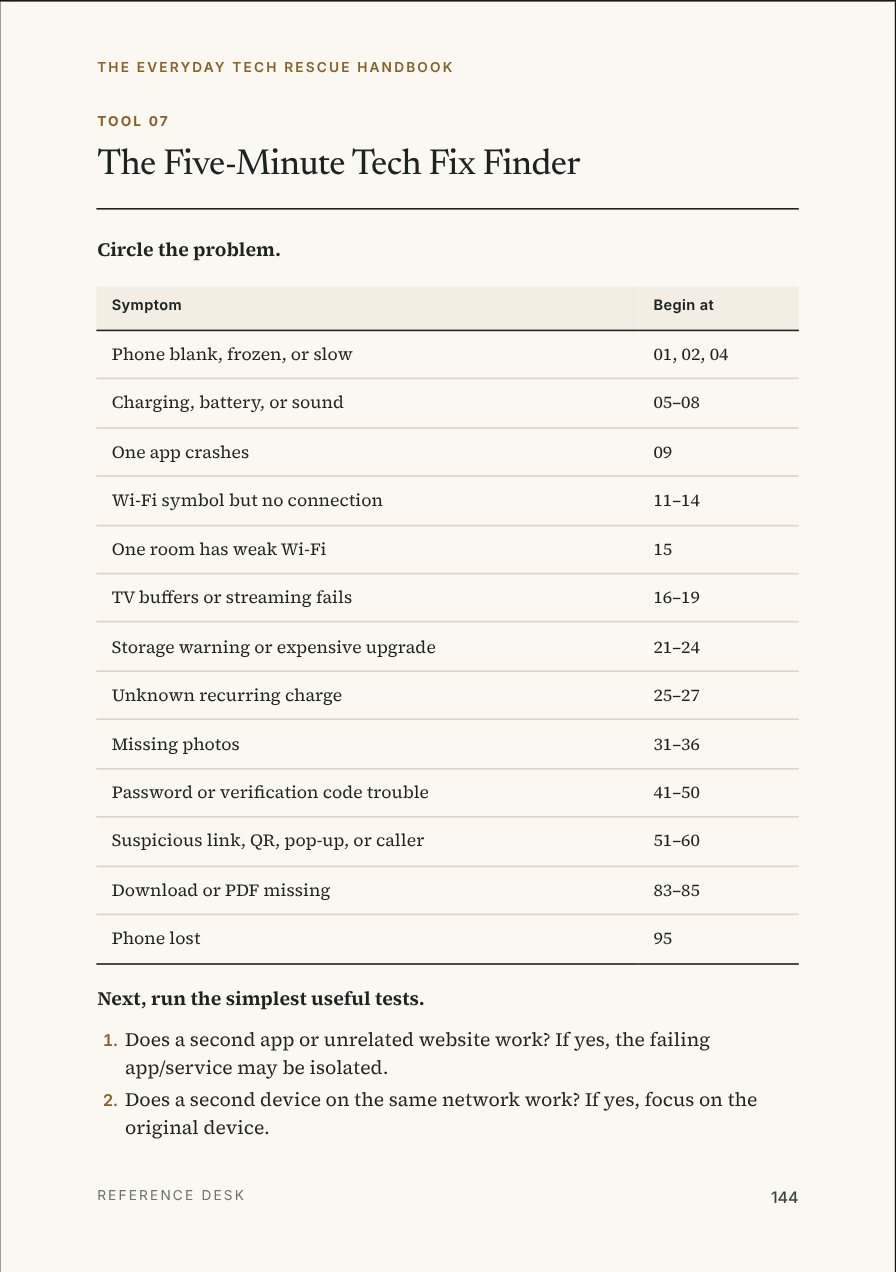
  • A symptom index to help you find the relevant fix quickly
  • Step-by-step checks for common iPhone and Android phone problems
  • Practical guidance for Wi-Fi, streaming devices, smart TVs, and online tasks
  • Safer decision paths for storage, photos, backups, passwords, and suspicious messages
  • Seven printable worksheets, including a tech-fix finder, pre-deletion check, expense audit, backup map, and suspicious-message card
  • A glossary and directory of official support resources
Get the handbook for $29
  • Secure checkout by Gumroad
  • Instant download

Questions

Questions, answered

Do I need to read the handbook from beginning to end?
No. Start with the symptom index, find the relevant solution, and work through the safe first checks. The handbook is organized as a reference you can return to whenever a new problem appears.
Does it explain both iPhone and Android?
Yes. It covers common tasks on iPhones and Android phones, with reminders that menus and button sequences vary by model, app, and software version. Always stop and check current official instructions when a screen does not match.
Can the handbook help if my phone says storage is full?
It explains how to investigate which categories use storage, why device space and cloud storage are different, and what to verify before removing files or paying for more space. It cannot promise how much storage you will recover.
Will it tell me to reset my phone or delete my photos?
The handbook starts with observation and reversible checks. It warns against using a factory reset or deleting synchronized photos as an experiment, and provides a worksheet for decisions that could remove valuable data.
Can I print the worksheets?
Yes. Seven worksheets inside the PDF are designed as printable reference tools. They include a five-minute fix finder, a pre-deletion checklist, a phone emergency card, and other practical decision aids.
Is this a subscription or a video course?
No. The offer is for one downloadable digital PDF handbook at $29 USD. It is not a video course, live coaching, device repair service, or ongoing technical support plan.
Will every repair or troubleshooting step work on my device?
No. Devices, software, carrier settings, and services vary. The handbook explains a practical method and when to stop, verify current provider guidance, or seek qualified assistance. Results cannot be guaranteed.
What if a caller, text, or popup says my account is in danger?
The safety chapter explains how to pause, avoid sharing passwords or codes, and check claims through a contact method you find independently. If money, account access, or personal information is already at risk, promptly contact the relevant real institution.
The Everyday Tech Rescue Handbook

Ready when you are

Your next tech problem deserves a safer first step.

Keep 100 practical solutions and seven printable tools close. Find the symptom, check the consequences, and make one informed change at a time.

  • Instant download
  • 172 pages
  • 7 worksheets
The Everyday Tech Rescue HandbookInstant download
Get the book$29$71−59%